 CARLOS DIEGO C. P.
SaaS Factory (The Series) · Part 3 of 3
SaaS Factory (The Series) — Data Partitioning: Storage Strategies in SaaS (Part 3/3)
In this post, we'll talk about Data Partitioning and Storage Strategies in SaaS.
Keywords
In this post, we'll talk about Data Partitioning and Storage Strategies in SaaS.
As a general architectural principle, developers typically try to introduce layers or frameworks that centralize and abstract away the horizontal aspects of their applications. The goal here is to centralize and standardize tenant resolution policies and strategies. You could, for example, introduce a data access layer that injects tenant context into data access requests. That would simplify development and limit how much developers need to know about how tenant identity flows through the system.
Having this layer in place also gives you more options for policies and strategies that may vary from tenant to tenant. It also creates a natural opportunity to centralize the configuration and tracking of storage activity.
Linked Account Silo Model
Before we dig into the specifics of each storage service, let's look at how you can use AWS Linked Accounts to implement the silo model on top of any of the AWS storage solutions. To achieve a silo with this approach, your solution needs to provision a separate linked account for each tenant. This can truly achieve a silo, because all of a tenant's infrastructure is completely isolated from other tenants.
The linked account approach relies on the consolidated billing feature, which lets customers associate child accounts with an overall payer account. The idea here is that, even with separate linked accounts for each tenant, billing for those tenants is still aggregated and presented as part of a single invoice for the payer account.
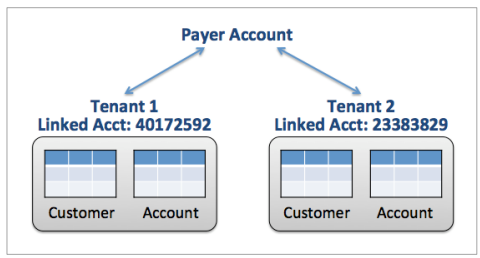
*Silo model with linked accounts*
At first glance, this may seem like a very attractive strategy for SaaS providers that require a silo environment. It can certainly simplify some aspects of managing and migrating individual tenants. Building a view of your tenants' costs would also be more straightforward, because you can summarize AWS spending at the linked account level.
Even with these advantages, the linked account silo model has important limitations. Provisioning, for example, is certainly more complex. In addition to creating the tenant's infrastructure, you need to automate the creation of each linked account and adjust whatever limits are required. The bigger challenge, however, is scale. AWS has constraints on the number of linked accounts you can create, and those limits likely won't align with environments that will be creating large numbers of new SaaS tenants.
Multitenancy in DynamoDB
The nature of how data is defined and managed by DynamoDB adds some new twists to how you approach multi-tenancy. While some storage services align well with traditional data partitioning strategies, DynamoDB has a somewhat less direct mapping to the silo, bridge and pool models. With DynamoDB, you have to consider some additional factors when selecting your multi-tenant strategy. The following sections explore the AWS mechanisms commonly used to realize each of the multi-tenant partitioning schemes in DynamoDB.
Silo Model
Before looking at how you can implement the silo model in DynamoDB, you should first consider how the service defines and controls access to data. Unlike RDS, DynamoDB has no notion of a database instance. Instead, all tables created in DynamoDB are global to an account within a region. That means every table name in that region must be unique for a given account.
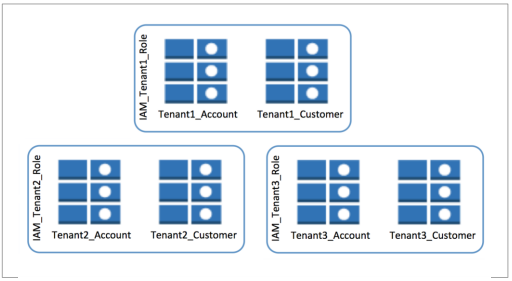
*Silo model with DynamoDB tables*
If you implement a silo model in DynamoDB, you'll need to find a way to create a grouping of one or more tables associated with a given tenant. The approach must also create a secure, controlled view of those tables to satisfy the security requirements of silo customers, preventing any possibility of cross-tenant data access. The figure shows an example of how you might achieve this tenant-scoped grouping of tables. Notice that two tables are created for each tenant (Account and Customer). These tables also have a tenant identifier appended to the table names. This satisfies DynamoDB's table naming requirements and creates the necessary binding between the tables and their associated tenants. Access to these tables is also controlled by introducing IAM policies. Your provisioning process needs to automate the creation of a policy for each tenant and apply that policy to the tables owned by a given tenant.
This approach achieves the fundamental isolation goals of the silo model by defining clear boundaries between each tenant's data. It also allows tuning and optimization on a tenant-by-tenant basis. You can tune two specific areas:
- Amazon CloudWatch metrics can be captured at the table level, simplifying the aggregation of tenant metrics for storage activity.
- Table write and read capacity, measured as input and output per second (IOPS), is applied at the table level, letting you create different scaling policies for each tenant.
The disadvantages of this model tend to be more on the operational and management side. Clearly, with this approach, your operational views of a tenant require some knowledge of the tenant table naming scheme in order to filter and present information in a tenant-centric context. The approach also adds a layer of indirection to any code that needs to interact with these tables. Every interaction with a DynamoDB table requires you to inject the tenant context to map each request to the appropriate tenant table.
SaaS providers that adopt a microservices-based architecture also have another layer of considerations. With microservices, teams typically distribute storage responsibilities to individual services. Each service has the freedom to determine how it stores and manages data. This can complicate your isolation story in DynamoDB, requiring you to expand your population of tables to meet the needs of each service. It also adds another dimension of scoping, where each table for each service identifies its binding to a service. To offset some of these challenges and align better with DynamoDB, consider having a single table for all of your tenant data. This approach offers several efficiencies and simplifies the provisioning, management and migration profile of your solution.
In most cases, using separate DynamoDB tables and IAM policies to isolate your tenant data meets the needs of your silo model. Your only other option is to consider the linked account silo model described earlier. However, as outlined earlier, the linked account isolation model comes with additional limitations and considerations.
Bridge Model
For DynamoDB, the line between the bridge model and the silo model is very thin. Essentially, if your goal in using the bridge model is to have a single account with a unique schema variation for each customer, you can see how that can be achieved with the silo model described earlier.
For bridge, the only question would be whether you could relax some of the isolation requirements described for the silo model. You can achieve this by eliminating the introduction of any table-level IAM policies. Assuming your tenants don't require full isolation, you could argue that removing the IAM policies may simplify your provisioning scheme. However, even with bridge there is merit in isolation. So while dropping IAM isolation may be appealing, it's still good SaaS practice to leverage constructs and policies that can restrict cross-tenant access.
Pool Model
Implementing the pool model in DynamoDB requires you to step back and consider how the service manages data. As data is stored in DynamoDB, the service must continually assess and partition the data to achieve scale. If your data profile is evenly distributed, you can simply rely on this underlying partitioning scheme to optimize the performance and cost profile of your SaaS tenants.
The challenge here is that data in a multi-tenant SaaS environment typically does not have an even distribution. SaaS tenants come in all shapes and sizes and, as such, their data is anything but uniform. It is very common for SaaS vendors to end up with a handful of tenants that consume the majority of their data footprint.
Knowing this, you can see how it creates problems for implementing the pool model on top of DynamoDB. If you simply map tenant identifiers to a DynamoDB partition key, you'll quickly find that you also create “hot spot” partitions. Imagine having one very large tenant that would undermine how effectively DynamoDB partitions your data. These hot spots can affect the cost and performance of your solution. With a suboptimal distribution of your keys, you need to increase IOPS to offset the impact of your hot partitions. This need for higher IOPS translates directly into higher costs for your solution.
To solve this problem, you must introduce some mechanism to better control the distribution of your tenant data. You'll need an approach that doesn't rely on a single tenant identifier to partition your data. All of these factors lead down a single path — you must create a secondary sharding model to associate each tenant with multiple partition keys.
Let's look at an example of how you might bring this solution to life. First, you need a separate table, which we'll call the “tenant lookup table”, to capture and manage the mapping of tenants to their corresponding DynamoDB partition keys. The following figure shows an example of how you might structure your tenant lookup table.
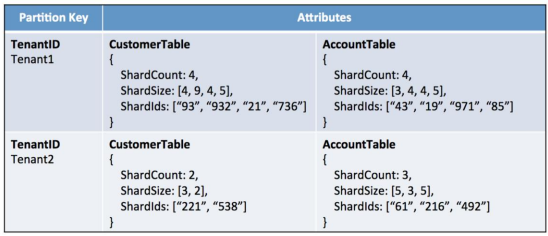
*Tenant Lookup Table*
This table includes mappings for two tenants. The items associated with these tenants have attributes that contain sharding information for each table associated with a tenant. Here, our tenants have sharding information for their Customer and Account tables. Notice also that for each tenant-table combination, there are three pieces of information that represent the current sharding profile for a table. These are:
- ShardCount: An indication of how many shards are currently
associated with the table;
- ShardSize: The current size of each of the shards;
- ShardIds: A list of partition keys mapped to a tenant (for a table).
With this mechanism in place, you can control how data is distributed for each table. The indirection of the lookup table gives you a way to dynamically adjust a tenant's sharding scheme based on the amount of data it is storing.
Tenants with a particularly large data footprint will be given more shards. Because the model configures sharding on a table-by-table basis, you have much more granular control over mapping a tenant's data needs to a specific sharding configuration. This lets you better align your partitioning with the natural variations that tend to show up in your tenants' data profile.
Although introducing a tenant lookup table gives you a way to address the distribution of tenant data, it doesn't come without a cost. This model now introduces a level of indirection that you must address in your solution's data access layer. Instead of using a tenant identifier to access your data directly, you first look up the shard mappings for that tenant and use the union of those identifiers to access your tenant data. The sample Customer table in the following figure shows how data would be represented in this model.
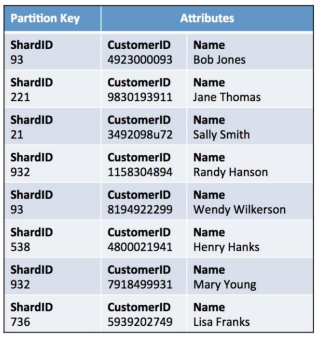
*Customer table with shard IDs*
In this example, the ShardID is a direct mapping from the table shown in the figure. That tenant lookup table included two separate lists of shard identifiers for the Customer table, one for Tenant1 and another for Tenant2. These shard identifiers correlate directly with the values you see in this sample customer table. Notice that the actual tenant identifier never appears in this customer table.
Multitenancy in RDS
With so many earlier SaaS systems delivered on relational databases, the developer community has established some common patterns for addressing multi-tenancy in these environments. In fact, RDS has a more natural mapping to the silo, bridge and pool models.
How data is built and represented in RDS is an extension of unmanaged relational environments. The basic mechanisms available in MySQL, for example, are also available to you in RDS. That makes achieving multitenancy across all RDS flavors relatively straightforward.
The following sections describe the various strategies that are commonly employed to realize the partitioning models in RDS.
Silo Model
You can achieve the silo pattern on AWS in several ways. However, the most common and simplest approach to achieving isolation is to create database instances for each tenant. Through instances, you can reach a level of separation that typically satisfies customers' compliance needs without the overhead of provisioning entirely separate accounts.
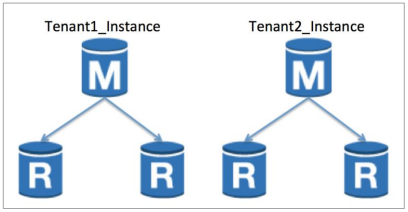
*RDS instances as Silos*
Bridge Model
Achieving the bridge model in RDS fits the same themes we see across all the storage models. The basic approach is to leverage a single instance for all tenants while creating separate representations for each tenant within that database. This introduces the need for table provisioning and runtime resolution to map each table to a given tenant.
The bridge model gives you the opportunity to have tenants with different schemas and some flexibility when migrating tenant data. You could, for example, have different tenants running different versions of the product at a given point in time and gradually migrate schema changes on a tenant-by-tenant basis.
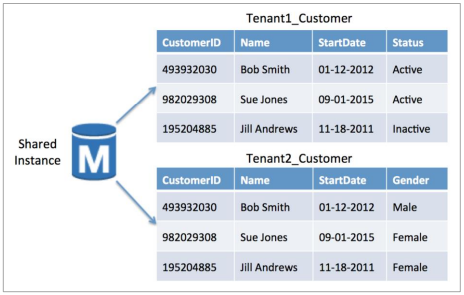
*Bridge Model in RDS*
Pool Model
The pool model for RDS relies on traditional relational indexing schemes to partition tenant data. As part of moving all tenant data into a shared infrastructure model, you store tenant data in a single RDS instance and the tenants share common tables. These tables are indexed with a unique tenant identifier that is used to access and manage each tenant's data.
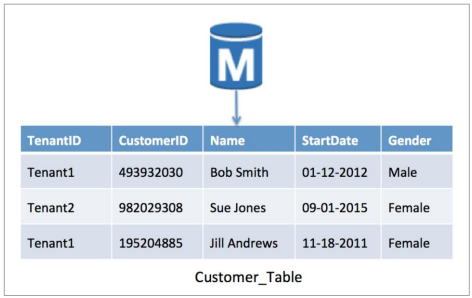
*Pool model in RDS with a shared schema*
Keeping an eye on agility
The array of multi-tenant storage options can be daunting. It can be challenging to identify the solution that represents the best mix of flexibility, isolation and manageability. While it's important to consider every option, it's also essential to continually factor agility into your multi-tenant storage thinking. The success of SaaS organizations is often heavily influenced by how much agility is built into their solution.
The storage technology and isolation model you select directly affect your ability to easily deploy new features and functionality. The shape and content of your data often change to support new features, which means your underlying storage model must accommodate those changes without requiring downtime. Each isolation model has pros and cons when it comes to supporting this seamless migration. As you weigh your options, give these factors the appropriate weight.
Conclusion
The storage needs of SaaS customers are not simple. The reality of SaaS is that your company's domain, customers and legacy considerations affect how you determine which combination of multi-tenant storage options best meets your business needs.
Although there is no single strategy that universally fits every environment, it's clear that some models align better with the core principles of the SaaS delivery model. In general, pool-based storage approaches — on any AWS storage technology — align well with the need for a unified way to manage and operate a multi-tenant environment. Having all your tenants in a shared repository and representation simplifies and unifies your operational and deployment footprint, enabling cross-tenant views of health and performance.
The silo and bridge models certainly have their place and, for some SaaS vendors, they are absolutely necessary. The key here is that, if you go down that path, agility can become more complicated. Some AWS storage technologies are better positioned to support isolated tenant storage schemes. Building a silo model in RDS, for example, is less complex than in DynamoDB. Generally, whenever you rely on linked accounts as your partitioning model, you'll face more provisioning, management and scaling challenges.
In the next post, we'll talk about how to implement the overall Identity and Access architecture in software as a service solutions on AWS.
SaaS Factory (The Series) — How to Build Software as a Service Solutions on AWS
See you then! =)
Comments
Every comment is moderated before it appears here. Nothing is published automatically.
Loading…