 CARLOS DIEGO C. P.
Technical Post · Amazon Web Services
What AWS Landing Zone is and how to implement it using Terraform
When companies start using the AWS cloud, they face the challenge of structuring their accounts and services in a secure, scalable…
Keywords
When companies start using the AWS cloud, they face the challenge of structuring their accounts and services in a way that is secure, scalable, and manageable. This is where the concept of an AWS Landing Zone comes in. In this post, we will explore what an AWS Landing Zone is, its benefits, and how to build a reference architecture using Terraform.
What is an AWS Landing Zone?
As the official AWS material describes it:
A landing zone is a well-architected, multi-account AWS environment that is scalable and secure. It is a starting point from which your organization can quickly launch and deploy workloads and applications with confidence in your security and infrastructure environment. Building a landing zone involves technical and business decisions to be made across account structure, networking, security, and access management, in line with your organization's growth and business goals for the future.
As you begin to use AWS at scale, you may look to AWS for prescriptive guidance and an approach to establishing your environment. AWS best practices in this area focus on the need to isolate resources and workloads across multiple AWS accounts (resource containers) for isolation and to scope down the blast radius. The next section explains why you would want to use multiple accounts.
AWS Landing Zone is an architectural solution that lets you set up a secure and scalable initial AWS environment with best practices built in. It helps organizations set up multiple AWS accounts, defining security, governance, and operations standards.
The main elements of a Landing Zone are:
AWS Account Organization:
- Separate accounts for different workloads, such as production, development, and audit.
- Enables Service Control Policies (SCPs) to manage restrictions and permissions across accounts.
Security and Compliance:
- Integration with AWS IAM to define roles and permissions.
- Centralized logging with AWS CloudTrail and AWS Config for monitoring.
- Automated compliance standards.
Standardized Networking:
- A shared network topology that includes Amazon VPCs, subnets, and cross-account integrations.
- Internet gateways and service gateways (such as AWS Transit Gateway) to connect distributed workloads.
Automation and Governance:
- IaC (Infrastructure as Code) to create and manage resources efficiently.
- Governance and security standards applied from the very start of the setup.
Benefits of a Landing Zone
Implementing a Landing Zone brings several important benefits to organizations of all sizes:
Improved Security:
- Assurance that accounts and workloads follow security best practices.
- Centralized logs help detect suspicious activity and support audits.
Scalability and Flexibility:
- Supports rapid expansion without compromising the base structure.
- New accounts can be added with predefined standards.
Standardization and Governance:
- Uniform network, permission, and policy configurations.
- Centralized control over unauthorized actions.
Regulatory Compliance:
- Tools such as AWS Config help ensure compliance standards are applied consistently.
Operational Efficiency:
- Fewer manual errors.
- Simpler maintenance through automation.
Key Components of a Landing Zone
AWS Organizations:
- Manages hierarchies and relationships between accounts.
- Enables SCPs to define what each account can and cannot do.
Centralized Architectural Logging:
- AWS CloudTrail to monitor events across all accounts.
- AWS Config to check resource compliance.
Networking and Connectivity:
- Shared VPCs and AWS Transit Gateway for interconnection.
- Segmented subnets for different workloads.
Identity Management:
- AWS IAM and AWS SSO for access management.
Cost Strategy:
- Consolidated billing with AWS Cost Explorer and the Billing Dashboard.
Implementing an AWS Landing Zone with Terraform
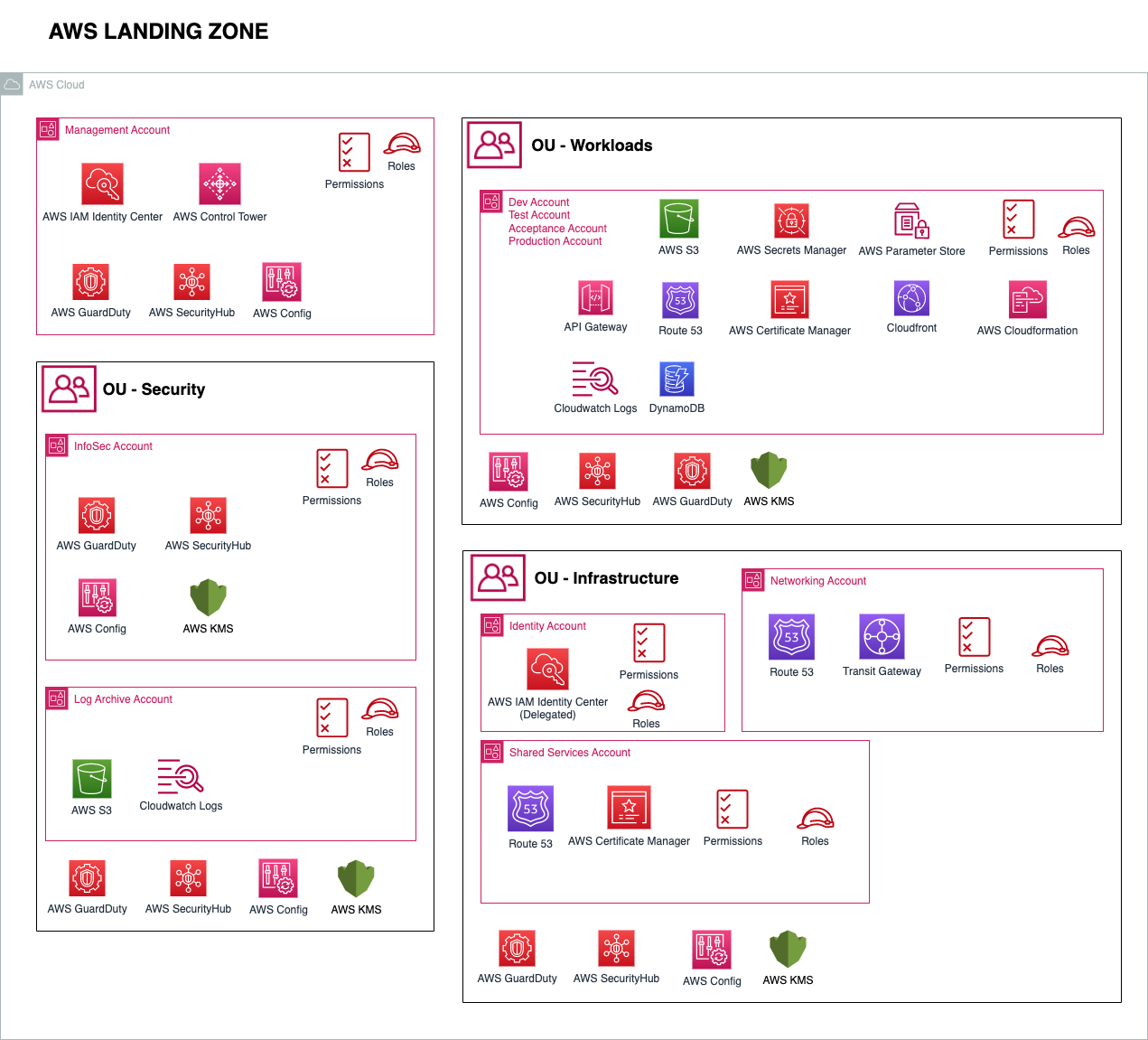
Reference Architecture Overview
- Accounts: Production, Development, Audit, and Centralized Logs.
- Policies: SCPs to enforce restrictions.
- Shared Network: A centralized VPC with public and private subnets.
- Logs: CloudTrail and AWS Config storing logs in a central account.
- Automation: IaC for consistent standards.
Prerequisites for provisioning the Landing Zone
- AWS account setup (management account)
- An IAM user configured in the management account with AWS Control Tower and AWS Organizations permissions set up
- AWS accounts in the same organization to be imported (create the required AWSControlTowerExecution role in each account, clean up the default VPC)
- CI/CD infrastructure role policy defined
- SSO users, groups, and permissions defined for all accounts
- Regions enabled
Creating the Landing Zone
Bootstrapping the AWS Landing Zone using AWS Control Tower*
*manual actions in the AWS console
Create a Landing Zone by setting up AWS Control Tower in the management account (configure Control Tower to create the following):
- OU — Security (InfoSec and Log Archive accounts)
- OU — Workloads (DTAP)
Create any additional OUs you need
- OU — Infrastructure
Enroll/Create the required AWS accounts
- Network account for OU — Infrastructure
- Shared services for OU — Infrastructure
- Any DTAP accounts for OU — Workloads (DTAP)
- Identity account for OU — Infrastructure
Enable trusted access in AWS Organizations and delegate administration of the following services
- IAM Identity Center to the Identity account
- Security Hub to the InfoSec account
- AWS GuardDuty to the InfoSec account
- AWS Config to the InfoSec account
- AWS Systems Manager to the shared services account
- Configure AWS SSO (IAM Identity Center) — Identity account
- Create IAM Identity Center permission sets
- Create IAM Identity Center groups
- Create IAM Identity Center users and assign them to groups
- Associate IAM Identity Center groups with permission sets and assign them to their respective accounts
- Configure AWS Security Hub — InfoSec account
In the main account, set up AWS Organizations and create the accounts
data “aws_caller_identity” “current” {}
provider “aws” {
 region = “us-east-1”
}
resource “aws_organizations_organization” “main” {
 feature_set = “ALL”
}
resource "aws_organizations_account" "prod" {
 name = "Production"
 email = "prod@example.com"
 role_name = "OrganizationAccountAccessRole"
}
resource "aws_organizations_account" "dev" {
 name = "Development"
 email = "dev@example.com"
 role_name = "OrganizationAccountAccessRole"
}
resource "aws_organizations_account" "logs" {
 name = "Logs"
 email = "logs@example.com"
 role_name = "OrganizationAccountAccessRole"
}
In the main account, set up the Policies and SCPs
resource "aws_organizations_policy" "deny_s3_public_access" {
  name        = "DenyS3PublicAccess"
  description = "Prevents public access to S3 buckets"
  content = <<EOF
{
  "Version": "2012-10-17",
  "Statement": [
    {
      "Sid": "DenyS3PublicAccess",
      "Effect": "Deny",
      "Action": "s3:PutBucketPolicy",
      "Resource": "*",
      "Condition": {
        "StringEquals": {
          "s3:x-amz-acl": "public-read"
        }
      }
    }
  ]
}
EOF
}

resource "aws_organizations_policy_attachment" "attach_policy" {
  policy_id = aws_organizations_policy.deny_s3_public_access.id
  target_id = aws_organizations_account.prod.id
}
In the logs account, create the Centralized Logs
resource “aws_s3_bucket” “centralized_logs” {
 bucket = “landing-zone-central-logs”
 acl = “private”
}

resource “aws_cloudtrail” “main” {
 name = “OrganizationTrail”
 s3_bucket_name = aws_s3_bucket.centralized_logs.bucket
 is_multi_region_trail = true
 is_organization_trail = true
}
In the network account, create the Shared Networks
resource “aws_vpc” “shared” {
 cidr_block = “10.0.0.0/16”
 enable_dns_support = true
 enable_dns_hostnames = true
 tags = {
 Name = “Shared-VPC”
 }
}

resource “aws_subnet” “public” {
 count = 2
 vpc_id = aws_vpc.shared.id
 cidr_block = cidrsubnet(aws_vpc.shared.cidr_block, 4, count.index)
 map_public_ip_on_launch = true
 availability_zone = data.aws_availability_zones.available.names[count.index]
}
A well-configured AWS Landing Zone is essential to ensure security, scalability, and governance in your use of the cloud. With Terraform, you can automate the creation of a consistent architecture tailored to your organization's needs. This detailed guide serves as a starting point for building robust environments on AWS. If you have questions or suggestions, leave a comment!
Comments
Every comment is moderated before it appears here. Nothing is published automatically.
Loading…