 CARLOS DIEGO C. P.
Technical Post · Cloud Computing
Event-Driven Architecture with Kafka: Implementing MSK with Terraform and Python
In this post, we’ll explore Event-Driven Architecture (EDA) using Kafka as the backbone for event streaming, focusing on the managed Kafka…
Keywords
In this post, we’ll explore Event-Driven Architecture (EDA) using Kafka as the backbone for event streaming, focusing on the managed Kafka service (MSK) on AWS. We’ll also walk through how to set up MSK using Terraform, and create a simple Python application that interacts with Kafka to produce and consume messages.
What is Event-Driven Architecture?
Event-Driven Architecture (EDA) is a software design pattern where system components communicate through events. Instead of having components directly call each other, they produce events and react to them. This decouples components, allowing systems to scale more effectively, handle real-time data, and become more resilient to changes.
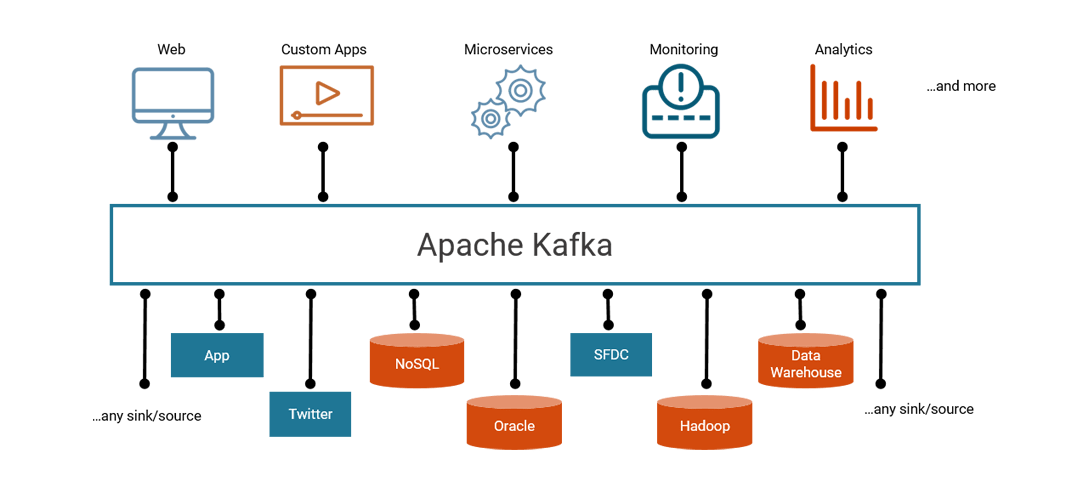
Kafka is one of the most popular platforms used for EDA because of its distributed event streaming capabilities. Kafka enables applications to publish and subscribe to events (or messages), which are stored in topics. These messages can then be processed by consumers at any given time.
Why Use Kafka?
- Scalability: Kafka is highly scalable, making it suitable for large-scale applications.
- Durability: Messages in Kafka are durable, meaning they can be stored for as long as needed, even if the consumers are down.
- Performance: Kafka can handle millions of messages per second with low latency.
- Fault Tolerance: Kafka is built to handle failure, offering replication and partitioning to ensure high availability.
Managed Kafka Service (MSK)
AWS Managed Streaming for Apache Kafka (MSK) is a fully managed service that makes it easy to build and run applications using Kafka. With MSK, AWS handles the operational burden of managing and scaling Kafka clusters, so you can focus on building applications instead of infrastructure.
Why Use MSK?
- Fully Managed: AWS takes care of provisioning, scaling, and maintaining Kafka clusters.
- Integration: MSK integrates well with other AWS services like S3, Lambda, and CloudWatch.
- Security: You can secure your Kafka clusters with IAM, VPCs, and encryption.
- Cost-Effective: MSK is priced based on the resources you use, making it more predictable in terms of cost.
Setting Up MSK with Terraform
Terraform makes it easy to define and provision MSK clusters. Here’s how to set up an MSK cluster using Terraform:
Step 1: Define the MSK Cluster in Terraform
We’ll define our Kafka cluster in Terraform, specifying the number of broker nodes, their instance types, and security configurations.
provider "aws" {
  region = "us-east-1"
}

resource "aws_msk_cluster" "kafka_cluster" {
  cluster_name           = "my-kafka-cluster"
  kafka_version          = "2.8.1"
  number_of_broker_nodes = 3

  broker_node_group_info {
    instance_type = "kafka.m5.large"
    client_subnets = [
      aws_subnet.my_subnet1.id,
      aws_subnet.my_subnet2.id,
      aws_subnet.my_subnet3.id
    ]
    security_groups = [aws_security_group.kafka_sg.id]
  }

  encryption_info {
    encryption_at_rest_kms_key_arn = aws_kms_key.kafka_kms_key.arn
  }

  logging_info {
    broker_logs {
      cloudwatch_logs {
        enabled   = true
        log_group = aws_cloudwatch_log_group.kafka_log_group.name
      }
    }
  }
}

resource "aws_security_group" "kafka_sg" {
  name        = "kafka-security-group"
  description = "Security group for Kafka brokers"

  ingress {
    from_port   = 9092
    to_port     = 9092
    protocol    = "tcp"
    cidr_blocks = ["0.0.0.0/0"]
  }

  egress {
    from_port   = 0
    to_port     = 0
    protocol    = "-1"
    cidr_blocks = ["0.0.0.0/0"]
  }
}

resource "aws_kms_key" "kafka_kms_key" {
  description = "KMS key for Kafka encryption"
}

resource "aws_cloudwatch_log_group" "kafka_log_group" {
  name = "/aws/msk/my-kafka-cluster"
}
Step 2: Deploy the Infrastructure
Run the following commands to deploy the MSK cluster on AWS:
terraform init
terraform apply
Terraform will provision the Kafka cluster, security groups, and logging infrastructure.
Building a Python Application to Use Kafka
Now that we have the MSK cluster set up, let’s build a Python application that produces and consumes messages from a Kafka topic.
Step 1: Install Kafka Python Libraries
First, you’ll need to install kafka-python to interact with Kafka from your Python code:
pip install kafka-pythonStep 2: Producer Script
The producer sends messages to a specific Kafka topic. Here’s a simple example:
from kafka import KafkaProducer
import json
import time

# Create a Kafka producer
producer = KafkaProducer(
    bootstrap_servers=['<MSK_BROKER>'],
    value_serializer=lambda v: json.dumps(v).encode('utf-8')
)

def produce_messages():
    for i in range(10):
        message = {'event_number': i, 'message': f"This is message {i}"}
        producer.send('my-kafka-topic', message)
        print(f"Produced message {message}")
        time.sleep(1)

if __name__ == "__main__":
    produce_messages()
In this script:
- Replace
<MSK_BROKER>with your MSK broker's endpoint. - The script sends 10 JSON messages to the Kafka topic
my-kafka-topic.
Step 3: Consumer Script
Now, let’s create a consumer to read messages from the same topic:
from kafka import KafkaConsumer
import json

# Create a Kafka consumer
consumer = KafkaConsumer(
    'my-kafka-topic',
    bootstrap_servers=['<MSK_BROKER>'],
    value_deserializer=lambda v: json.loads(v.decode('utf-8'))
)

def consume_messages():
    for message in consumer:
        print(f"Consumed message: {message.value}")

if __name__ == "__main__":
    consume_messages()
The consumer listens for new messages in the my-kafka-topic topic and prints them as they arrive.
Final thoughts
In this post, we’ve introduced Event-Driven Architecture and explored how to implement Kafka using AWS MSK. By leveraging Terraform, we can quickly set up Kafka clusters, and with Python, we can build applications that produce and consume messages. MSK simplifies Kafka cluster management and integrates with the broader AWS ecosystem, making it a powerful tool for building real-time event-driven applications.
Now that you’ve got an MSK cluster and a working Python application, you can experiment with scaling your system, adding more producers and consumers, and integrating Kafka with other services in AWS.
See you in the next post! =)
Comments
Every comment is moderated before it appears here. Nothing is published automatically.
Loading…