 CARLOS DIEGO C. P.
Technical Post · Amazon Web Services
SaaS architecture migration strategies
The software as a service (SaaS) delivery model is very appealing to many organizations. Agility, responsiveness to…
Keywords
The software as a service (SaaS) delivery model is very appealing to many organizations. Agility, responsiveness to the market, shared infrastructure costs — all of these represent an opportunity for companies to transform how they build, operate, and monetize their products. The reality, however, is that these same organizations usually have a significant investment in their existing single-tenant offerings. While the appeal of SaaS is compelling, it's often unrealistic to expect teams to completely rebuild their applications and instantly embrace all the tenets and principles typically associated with multi-tenant environments.
The challenge, then, is for organizations to find creative ways to gradually move their solutions to a SaaS model without major disruption. As inviting as the benefits of SaaS may be, it's important to make the move to SaaS with care and forethought. Ultimately, you want to emerge from this transformation with a product that inherits the best characteristics of SaaS and becomes an enabler for the business. A simple lift-and-shift or some kind of pseudo-SaaS will likely undermine your long-term goals.
Any discussion of SaaS migration has to consider the full scope of what it means to build, deliver, support, and sell in a SaaS model. That means our discussion of migration must examine the influence of SaaS on the technical, business, and operational dimensions of transforming an application. Migration must continually look at all the moving parts of the SaaS landscape to determine which series of moves will let you ensure that your path forward includes the full value of SaaS.
How multi-tenant are you?
Before we dig into migration strategies, it's important to establish a solid foundation for the discussion of multi-tenancy. In the eyes of most developers, multi-tenancy equates to having all tenants running on a single footprint of infrastructure. In fact, many of the agility values associated with SaaS depend on this shared model. Cost, deployments, management, and competitive agility — all of them benefit greatly from the merits of shared infrastructure.
The problem is that this view of multi-tenancy isn't practical for every business or every domain. In fact, there are several different models used to deliver successful SaaS solutions. Indeed, for some, the move to SaaS may simply be a transfer of management responsibilities to a provider. So, as much as we'd love to have a single, universal destination for our migration effort, it's also fair to assume that the target end state of multi-tenancy is likely to vary. As a result, our migration strategies must vary as well.
Given this fluid definition of multi-tenancy, our review of migration strategies must cover several flavors of SaaS multi-tenancy. The migration process must allow for SaaS models in which some or all of a tenant's infrastructure may run in isolation. For providers and their tenants, these solutions are no less SaaS than any shared-infrastructure solution.
The trap you want to avoid, however, is using isolation as a migration crutch. If your tenants and your business would benefit from a shared infrastructure model, that should be your end goal. Don't let the convenience of isolation undermine your ability to migrate toward that goal.
Building a Foundation
Successful migrations, however complex, depend on adopting an incremental mindset in which you try to carve out parts of your system and migrate them piece by piece to a new model. By approaching this incrementally, you'll have a natural opportunity to identify and introduce the frameworks that will be essential to establishing a foundation that supports your adoption of SaaS technical and operational value systems. Logging, tenant configuration, service configuration, data access, metering — these are all areas where you'll likely need to introduce libraries that abstract your policies and your tenant awareness.
It's important to note that this isn't about spending months building tools and frameworks. It's simply recognizing that these foundational concepts need to emerge and become part of your thought process as you deliver the first pieces of your system in its new model.
The starting point
Clearly, there are far too many kinds of application design to propose a common starting point. At the same time, there are definitely architectural patterns that show up very often. Frameworks, tools, and general guidance have led many developers down the path of n-tier development.
With this architecture, we essentially have a web tier that is used to manage and deliver your application's assets. This tier is fronted by a load balancer that distributes traffic to web servers. The application's business logic lives in the application tier, which accesses your application's database (usually through some data access layer).
Providers will host or offer an on-premises solution where this architecture is replicated and customized based on each customer's needs. These environments tend to run in complete isolation and can often run different versions of the application. Each installation assumes it is serving the needs of a single tenant, and nowhere in the design or architecture is there any notion of multi-tenancy.
You'll also notice that the units of scale in this model are rather coarse. You have web servers and application servers. If some subset of functionality on an application server is causing a bottleneck, your only way to deal with it is to add more application servers. You can't really match the scale and profile of our compute resources (instances) to the more granular elements of our application's functionality.
While there are variants of this architecture model, the fundamentals are shared by many existing solutions. You may see the application tier further separated into families of services that target specific business functions (batch processing, caching, and so on). You may see a formal data access layer introduced. Even with these nuances, the basic model and approach remain largely unchanged.
Minimally Invasive Migration Themes
Given the architecture described above, the real question is how to start migrating environments of this nature to a SaaS model without fundamentally changing the design or architecture of our existing application. How do we start introducing multi-tenancy without requiring a rewrite of the entire solution? How do we tackle deployment automation and other SaaS agility principles as part of our migration effort? These are the challenges organizations face when they try to put together their migration roadmaps.
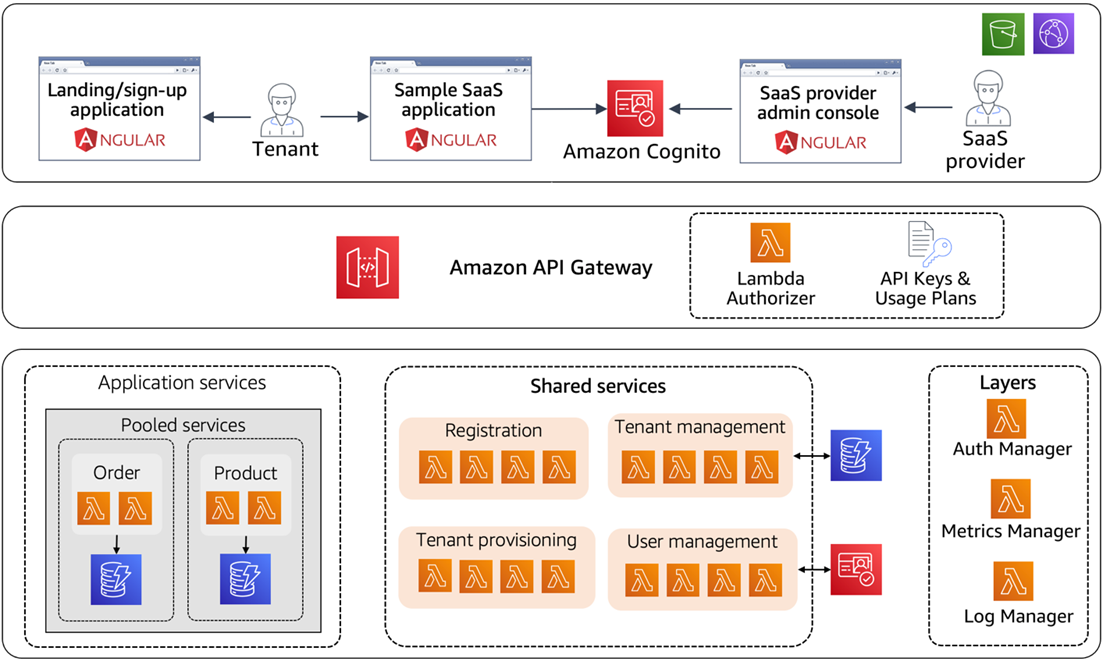
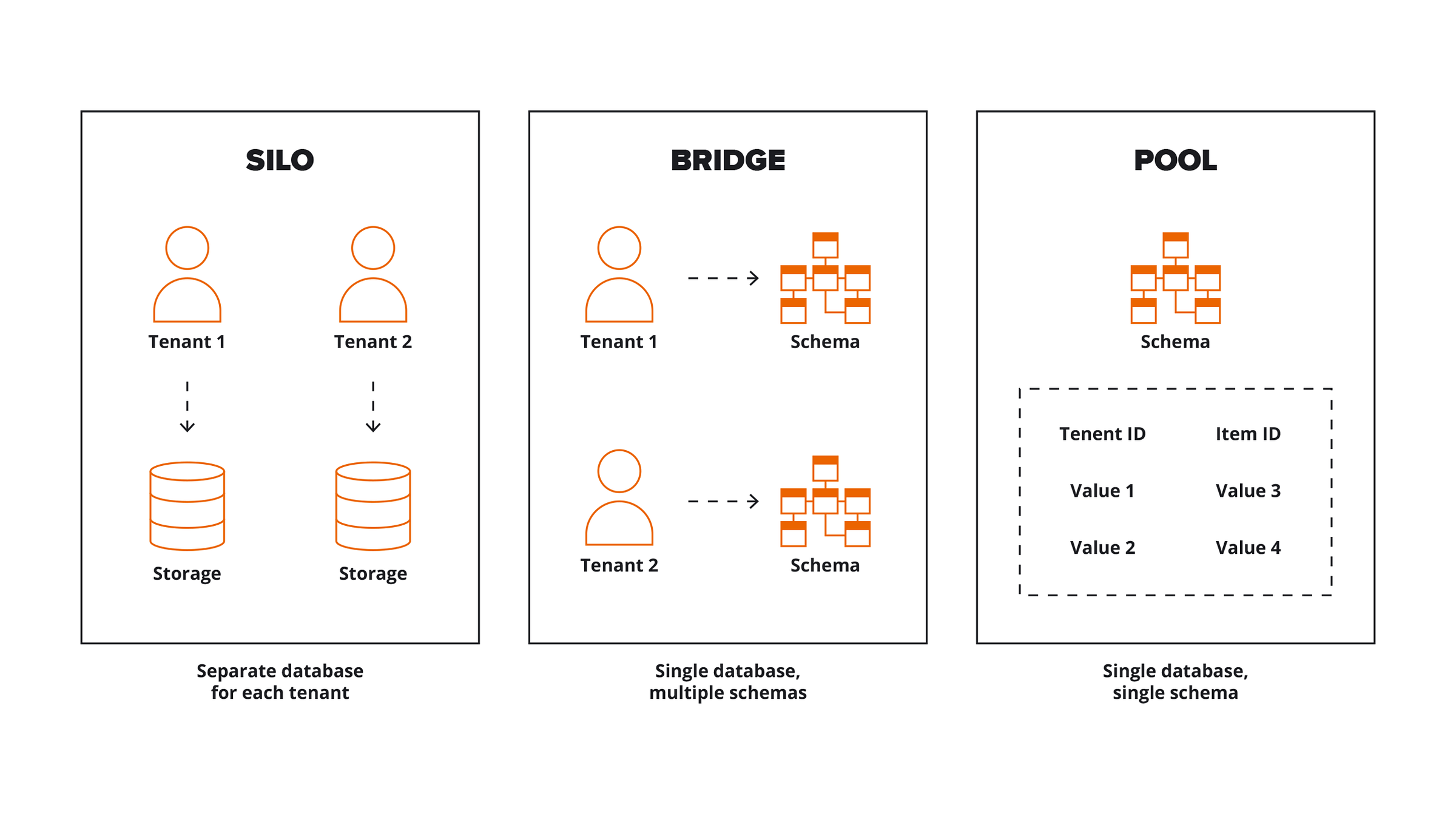
While there are certainly many ways to attack this problem, some patterns are more prevalent than others. The list of migration models we'll explore in this post includes:
- Silo Migration Model — introduces separate infrastructure for each tenant, fronting the experience with a single onboarding and authentication experience
- Layered migration model — the tiers of an application are incrementally migrated to a multi-tenant model
- Data migration model — the storage models are migrated to a multi-tenant model, while the rest of the application remains on siloed tenant infrastructure
The following sections will examine each of these minimally invasive migration themes and explore some of the key considerations that come with each model. It's also important to note that these solutions are not mutually exclusive.
Silo Migration Model
For many organizations, the silo model represents the most natural and appealing way to approach migration. The idea behind the silo model is the recognition that a shared infrastructure model may be too much to swallow at the outset.
The silo model creates a separate infrastructure stack for each tenant. As far as possible, migrations of this kind will try to limit changes to the existing design and simply take advantage of AWS services and constructs where they make the most sense. For example, the web and application tiers of the architecture will be deployed in Auto Scaling groups that span multiple Availability Zones. Even though each tenant scales independently, you can still apply elasticity to the siloed infrastructure and dynamically scale the number of web and application servers based on tenant loads.
Silo migrations often include a move to one of the AWS storage services. If, for example, you're running tenants on a SQL Server database, you'll probably consider using Amazon Relational Database Service (Amazon RDS) to meet your storage needs. This lets you shift more operational and availability responsibilities to AWS, and lets your operations team take advantage of the many options RDS offers to optimize scale and availability.
The silo model introduces a few new things when it comes to onboarding new tenants. Ideally, even in an isolated environment, you'd still want to make onboarding as simple as possible. That means presenting your tenants with a user interface and sign-up process that mirrors the same model we see in other SaaS environments, with fully automated provisioning of new tenants.
Moving to automated provisioning and surrounding your tenant infrastructure with tooling will be the focus of your initial migration effort. The investment you make here represents an opportunity to move in a more agile direction, promoting the centralization and automation of any tenant-specific configuration needs. The more you can bite off here, the better positioned you'll be to keep advancing your design and architecture.
Fortunately, automating this lifecycle is at the core of the DevOps tooling supported by AWS and its ecosystem. These tools will equip you with all the building blocks you need to build a robust continuous delivery pipeline that will drive the repeatability and stability of your system.
Layered Migration Model
With the layered migration model, the emphasis is on finding opportunities to move layers of your solution to multi-tenancy. The key to this approach is creating layers that can gradually move toward a shared multi-tenant model, while still allowing parts of the solution to keep their single-tenant design.
Although the web tier is shared in this diagram, you'll also notice that each tenant has its own distinct application tier. The web tiers route their traffic to the appropriate tenant's application tier based on their tenant context.
The appeal of this model is that it lets us take on more shared concepts without tackling the whole multi-tenant problem at once. In fact, the tier we chose didn't have to be the application tier. You can pick any tier in your environment and migrate it to a multi-tenant model. Then, as you see fit, slowly carve off the remaining tiers.
Like the silo and data migration models, the layered model depends on a parallel migration to automated provisioning. The main difference here is that the scope of what has to be provisioned now changes. The web tier can remain more or less constant, while new application tiers will be needed for each new tenant deployment.
Data migration model
Moving to multi-tenant data representations can be one of the most challenging aspects of adopting SaaS. Application code is often tightly intertwined with the structure and technology used to store the data. Despite this coupling, the data layer also represents a very clear boundary in your architecture that can be a natural target for migration.
In many respects, migrating to multi-tenant data is simply another variation of the layered migration model described above. However, this migration model tends to look more like a bottom-up strategy, in which you first solve the challenges of multi-tenant data before moving up the stack into the details of the application design.
Migrating your data gets much easier if your application has already introduced a data access layer. This layer usually abstracts away the details and limits the binding to a storage API or technology. If such a data layer exists, you'll be in a much better position to gracefully migrate your data to a multi-tenant model. The goal here would be to limit the impact on the clients of the data access layer while swapping the underlying data access implementation for something that includes tenant awareness and partitioning.
You can also use this time to reassess your application's storage technologies. You might, for example, consider a move from a relational model to NoSQL. However, a move of this nature is often seen as too invasive to take on in the early stages of migration. Later on, if you decide to decompose your application into smaller services, you'll be in a better position to select storage models that align with each service's needs.
Whichever path you choose, AWS has a rich set of storage options to choose from. If you're migrating from a relational model, for example, you can pick any of the relational solutions that are part of Amazon RDS (Aurora, MySQL, SQL Server, and so on). Amazon DynamoDB (NoSQL), Amazon Redshift (data warehousing), and Amazon ElastiCache can also be part of your storage migration strategy. When you opt for AWS storage solutions, you can also consider using the AWS Database Migration Service and the AWS Schema Conversion Tool to manage the migration of your existing data.
Changing the representation of your data also means migrating your existing data to the new multi-tenant representation. A common practice here is to move tenants one at a time to reduce risk and make the process more manageable. You can also use this approach to gain real-time insight into how your system performs as each tenant is moved to the new structure. This gives you a chance to tune and refine your storage configuration before all tenants have been migrated to the new environment.
This staged data migration can also be aligned with migrating tenants from an on-premises solution to AWS. The conversion of tenant data is applied as each tenant is provisioned and deployed into the AWS environment.
Migrating to an AWS storage service also creates an opportunity to bring in AWS Identity and Access Management (IAM) and Amazon CloudWatch metrics . With IAM, you can control access to your storage and further ensure that tenants are not allowed to access any data outside their domain. CloudWatch can be used to surface metrics about your storage activity and provide more data points that enhance your management and monitoring experience.
Management and monitoring migration
Management and monitoring apply universally to every migration model we've described. Since we're talking about migrating an existing solution, you probably already have some level of management and monitoring tooling in place. For example, most solutions already have mechanisms for aggregating and analyzing log information, along with some tools that provide a view of system health. Still, as part of your migration, you should think about how these tools need to evolve as you begin to embrace a more SaaS-focused value system.
Even if some aspects of your solutions remain single-tenant, you should consider building a management and monitoring experience that aggregates your tenant activity into a single, consolidated view of system health. SaaS agility depends on having detailed health information at your fingertips, which lets you proactively capture and respond to health events that, in some cases, may span multiple tenants. This experience should also provide a view of a single tenant's activity and health. This tenant-specific view is essential for supporting tenants who may be experiencing functional or performance issues.
By tackling management and monitoring in the early phases of your migration, you'll put yourself in a much better position to support more multi-tenant concepts as your environment evolves. This upfront investment will also let you bring more AWS metrics data into your management and monitoring view. You'll certainly want to pull CloudWatch metrics and events to assess the state of your environments. You can also introduce custom CloudWatch metrics to surface details unique to your application.
Overall, your migration to SaaS represents an opportunity to reassess your management and monitoring strategy. You should use this moment to look beyond your current tools and determine which combination of solutions best aligns with the SaaS value system you're adopting.
AWS and the AWS Partner Network (APN) ecosystem partners have solutions that can be used to meet many of your monitoring needs. These solutions let you build multiple views of activity that are often essential to supporting complex multi-tenant environments.
Operations migration
So much of the migration effort is focused on application design and architecture that we often overlook the operational aspects of migration. When moving a solution to AWS — under any SaaS migration model — you should look at how you can simplify and automate your operational footprint.
AWS and its ecosystem provide a rich set of tools you can use to build and enhance the operational profile of your SaaS offering. Adopting these tools, and the principles that come with them, should be a key element of any SaaS migration effort. If your organization hasn't embraced DevOps yet, your migration to SaaS represents an excellent opportunity to launch your technical and cultural transformation toward a DevOps mindset. In many respects, the move to DevOps will be at the heart of your migration toward agility and toward a new SaaS culture that supports the continuous, rapid evolution of your product.
Putting this automation in place early will help you create a foundation that simplifies the evolution of your application's design and architecture. Once the automation model is established, it becomes simpler to apply these mechanisms to new areas of the system.
The upfront investment in DevOps and automation may be high for some organizations, but the concepts are too fundamental to SaaS to put off. Making DevOps a priority also surfaces areas where teams may require new organizational structures and relationships.
The AWS stack includes several tools that can help with the DevOps migration. AWS CloudFormation , AWS Elastic Beanstalk, and AWS OpsWorks can be used to provision infrastructure and automate deployments. AWS also provides tools such as AWS CodeCommit , AWS CodePipeline, and AWS CodeDeploy to support continuous deployment orchestration. These solutions are often used in conjunction with DevOps automation tools built by the AWS ecosystem. You can, for example, use AWS CloudFormation to automate the configuration and provisioning of your infrastructure. A combination of AWS CodePipeline and AWS CodeDeploy can be used to build your continuous delivery solution. Take a look at the AWS DevOps page to learn more about DevOps on AWS.
It's important to note that the migration patterns described above often add an extra layer of configuration to your SaaS environment. Wherever you have isolated tenant infrastructure, you may also have configurations unique to those tenants. These configuration variations need to be captured, version-controlled, and stored in a repository that can be referenced by your DevOps lifecycle. This is essential to ensuring that your SaaS environment is deployed through a repeatable, reliable process.
In the next post, we'll talk about calculating tenant costs in SaaS environments.
SaaS Factory (The Series) — How to Build Software as a Service Solutions on AWS
See you in the next post!
Comments
Every comment is moderated before it appears here. Nothing is published automatically.
Loading…