 CARLOS DIEGO C. P.
Technical Post · Amazon Web Services
Configuring the AWS X-Ray Daemon
You can use command line options or a configuration file to customize the X-Ray daemon’s behavior. Most…
Keywords
You can use command line options or a configuration file to customize the X-Ray daemon’s behavior. Most options are available using both methods, but some are only available in configuration files and others only on the command line. In this post, we will show how to configure the AWS X-Ray daemon.
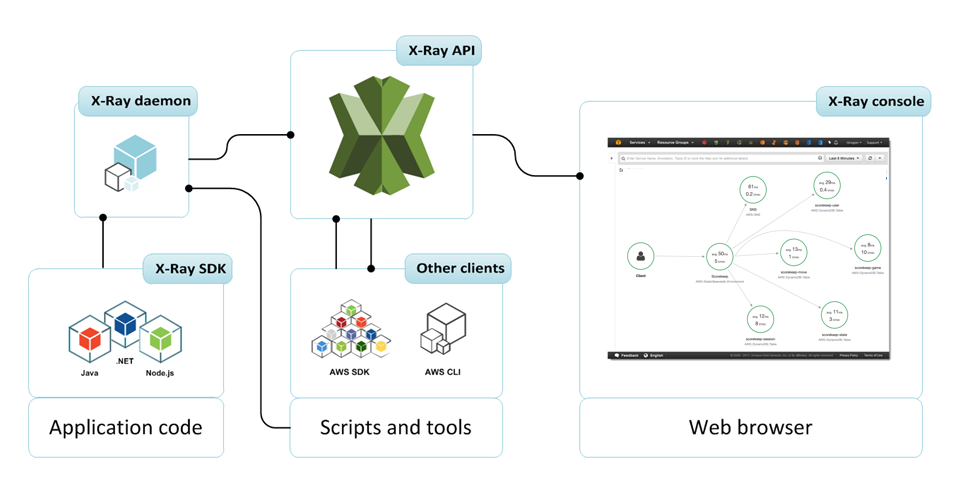
To get started, the only option you need to know about is -n or — region, which you use to set the Region that the daemon uses to send trace data to X-Ray.
~/xray-daemon$ ./xray -n us-east-2If you are running the daemon locally, that is, not on Amazon EC2, you can add the -o option to skip checking for instance profile credentials so the daemon will become ready more quickly.
~/xray-daemon$ ./xray -o -n us-east-2The rest of the command line options let you configure logging, listen on a different port, limit the amount of memory the daemon can use, or assume a role to send trace data to a different account.
You can pass a configuration file to the daemon to access advanced configuration options and do things like limit the number of concurrent calls to X-Ray, disable log rotation, and send traffic to a proxy.
Supported environment variables
The X-Ray daemon supports the following environment variables:
- AWS_REGION — Specifies the AWS Region of the X-Ray service endpoint.
- HTTPS_PROXY — Specifies a proxy address for the daemon to upload segments through. These can be either the DNS domain names or the IP addresses and port numbers used by your proxy servers.
Using command line options
Pass these options to the daemon when you run it locally or with a user data script.
Command line options
- -b, — bind- Listen for segment documents on a different UDP port.
- — bind “127.0.0.1:3000”
- Default — 2000.
- -t, — bind-tcp- Listen for calls to the X-Ray service on a different TCP port.
- -bind-tcp “127.0.0.1:3000”
- Default — 2000.
- -c, — config- Load a configuration file from the specified path.
- — config “/home/ec2-user/xray-daemon.yaml”
- -f, — log-file- Output logs to the specified file path.
- — log-file “/var/log/xray-daemon.log”
- -l, — log-level- Log level, from most verbose to least: dev, debug, info, warn, error, prod.
- — log-level warn
- Default — prod
- -m, — buffer-memory- Change the amount of memory in MB that buffers can use (minimum 3).
- — buffer-memory 50
- Default — 1% of available memory.
- -o, — local-mode- Don’t check for EC2 instance metadata.
- -r, — role-arn- Assume the specified IAM role to upload segments to a different account.
- — role-arn “arn:aws:iam::123456789012:role/xray-cross-account”
- -a, — resource-arn- Amazon Resource Name (ARN) of the AWS resource running the daemon.
- -p, — proxy-address- Upload segments to AWS X-Ray through a proxy. The proxy server’s protocol must be specified.
- — proxy-address "http://192.0.2.0:3000"
- -n, — region- Send segments to the X-Ray service in a specific Region.
- -v, — version- Show the AWS X-Ray daemon version.
- -h, — help- Show the help screen.
Using a configuration file
You can also use a YAML format file to configure the daemon. Pass the configuration file to the daemon by using the -c option.
~$ ./xray -c ~/xray-daemon.yamlConfiguration file options
- TotalBufferSizeMB- Maximum buffer size in MB (minimum 3). Choose 0 to use 1% of host memory.
- Concurrency — Maximum number of concurrent calls to AWS X-Ray to upload segment documents.
- Region — Send segments to the AWS X-Ray service in a specific Region.
- Socket — Configure the daemon’s binding.
- Logging — Configure logging behavior.
- LocalMode- Set to true to skip checking for EC2 instance metadata.
- ResourceARN — Amazon Resource Name (ARN) of the AWS resource running the daemon.
- RoleARN — Assume the specified IAM role to upload segments to a different account.
- ProxyAddress — Upload segments to AWS X-Ray through a proxy.
- Endpoint — Change the X-Ray service endpoint to which the daemon sends segment documents.
- NoVerifySSL — Disable TLS certificate verification.
- Version- Daemon configuration file format version. The file format version is a required field .
Example Xray-daemon.yaml
This configuration file changes the daemon’s listening port to 3000, turns off instance metadata checks, sets a role to use for uploading segments, and changes Region and logging options.
Socket:
 UDPAddress: “127.0.0.1:3000”
 TCPAddress: “127.0.0.1:3000”
Region: “us-west-2”
Logging:
 LogLevel: “warn”
 LogPath: “/var/log/xray-daemon.log”
LocalMode: true
RoleARN: “arn:aws:iam::123456789012:role/xray-cross-account”
Version: 2
See you in the next post! =)
Comments
Every comment is moderated before it appears here. Nothing is published automatically.
Loading…