 CARLOS DIEGO C. P.
Technical Post · Kubernetes
How to Set Up a Kubernetes Metrics Server on AWS
Metrics Server is a scalable, efficient source of container resource metrics for Kubernetes built-in autoscaling pipelines…
Keywords
Metrics Server is a scalable, efficient source of container resource metrics for Kubernetes built-in autoscaling pipelines.
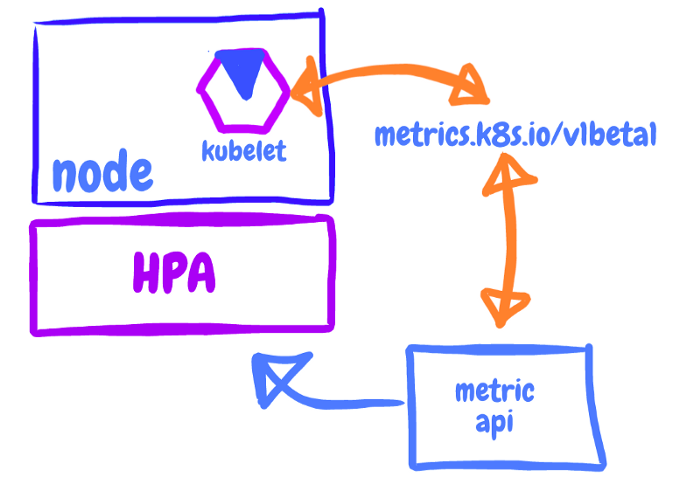
Metrics Server collects resource metrics from Kubelets and exposes them in the Kubernetes apiserver through the Metrics API for use by the Horizontal Pod Autoscaler and Vertical Pod Autoscaler. The Metrics API can also be accessed through kubectl top, which makes it easier to debug autoscaling pipelines.
Metrics Server is not meant for non-autoscaling purposes. For example, don’t use it to forward metrics to monitoring solutions, or as a source of monitoring solution metrics.
Kubernetes Metrics Server for EKS clusters
The Kubernetes Metrics Server is an aggregator of resource usage data in your cluster, and it isn’t deployed by default in Amazon EKS clusters. The Metrics Server is commonly used by other Kubernetes add-ons, such as the Horizontal Pod Autoscaler or the Kubernetes Dashboard.
This post explains how to deploy the Kubernetes Metrics Server on your Amazon EKS cluster.
Deploying the Metrics Server
Deploy the Metrics Server with the following command:
kubectl apply -f https://github.com/kubernetes-sigs/metrics-server/releases/latest/download/components.yamlVerify that the metrics-server deployment is running the desired number of pods with the following command.
kubectl get deployment metrics-server -n kube-systemOutput:
NAME READY UP-TO-DATE AVAILABLE AGE
metrics-server 1/1 1 1 6m
See you in the next post! =)
Comments
Every comment is moderated before it appears here. Nothing is published automatically.
Loading…