 CARLOS DIEGO C. P.
Technical Post · Amazon Web Services
Automating threat detection and blocking suspicious hosts with GuardDuty and WAF
Amazon GuardDuty is one of the security solutions AWS provides to protect AWS accounts and workloads. It's a…
Keywords
Amazon GuardDuty is one of the security solutions AWS provides to protect AWS accounts and workloads. It's an Intrusion Detection tool that incorporates threat intelligence and machine learning to detect unusual behavior, such as a website being attacked or hacked, or malicious software making its way onto a server.
AWS WAF is a web application firewall that helps protect web applications or APIs against common web exploits, letting us create security rules that block common attack patterns, such as SQL injection or cross-site scripting, and rules that filter specific traffic patterns you define.
Integrating Amazon GuardDuty with AWS Web Application Firewall helps us build an automated workflow to monitor suspicious activity in our AWS environment and take the necessary actions. With this solution, whenever GuardDuty detects any suspicious activity, it automatically updates the AWS Web Application Firewall web access control lists (WebACLs) and the VPC network access control lists (NACLs) to block communication from the suspicious host, and sends a notification to Slack.
Flow overview
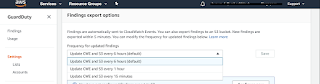
Security findings are generated by GuardDuty. We set the export frequency for updated active findings to 6 hours.
The CloudWatch event is triggered to filter the finding type as specified in the template.
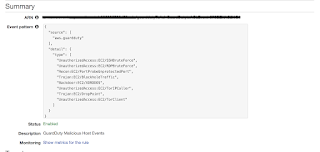
If the finding type matches the conditions specified in the template, a Lambda function is triggered and the finding type is parsed inside it.
Two Lambda functions are invoked by the CloudWatch Event:
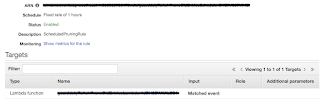
- One that checks whether there is an existing entry for the host in our database (we use Amazon DynamoDB to store the state data of blocked hosts). If it exists, it makes no changes; otherwise, it creates a rule in AWS WAF and in the VPC NACL.
- The second Lambda function runs every hour to remove entries from the WAF IPSets, the VPC NACLs, and the DynamoDB table that have exceeded the retention period.
- It then sends a Slack alert as soon as the IP is blocked.
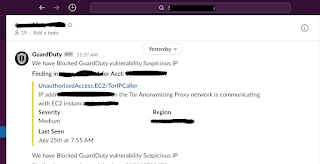
Integrating messages and alerts with Slack
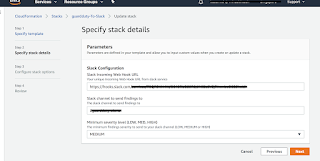
- Create a CloudFormation stack with the template provided on the official AWS website to enable Slack notifications for GuardDuty findings.
Enter the incoming webhook URL, the Slack channel name, and the severity level that matches your environment, as shown below:
- Use CloudFormation to create a deployment that enables the integration between Amazon GuardDuty and AWS Web Application Firewall. The template and the Lambda scripts for this deployment are available on the official AWS website.
- Upload the deployment Lambda scripts to the S3 bucket in the region where the deployment will take place;
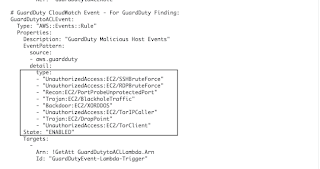
- Download the template and update the GuardDuty findings appropriate for your environment. The event is triggered based on the GuardDuty findings listed here.
- In the CloudFormation console, choose the Select template option and choose the template created in the step above.
- On the Specify Stack Details page, provide the following input parameters with the details that match your environment.
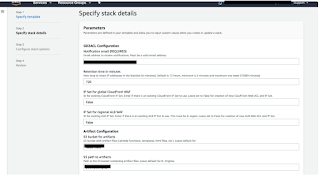
- Once the Lambda function is created, we need to test it by running a test event using the script below:
The subnet ID must match your environment.
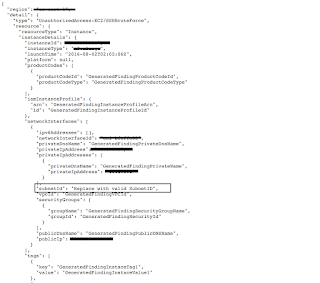
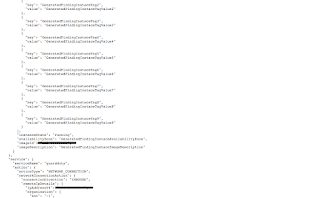
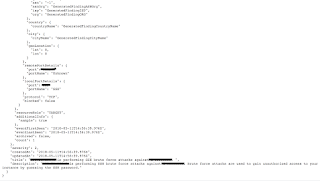
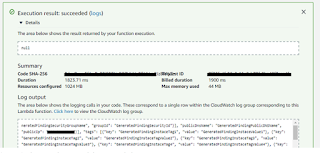
When the test event runs, the output should look as shown below:
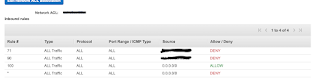
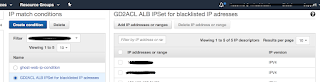
- After the test event runs, the DENY host entry is created in the NACL and also added to the CloudFront WAF IPSet and to the ALB WAF IPSet, as shown below. So we can confirm the solution is working as designed.
In the console, go to VPC → Subnets → select the subnet that was added to the test script mentioned above and check that the new entry generated by the test event has been created there.
In the console, go to WAF & Shield, click AWS WAF Classic view, and select IP addresses. Select the region where this solution is deployed — and then select the IPSet named GD2ACL ALB IPSet for blocklisted IP addresses. We can see the IP address added to the ALB IPSet, as shown below.
We used Amazon GuardDuty to automatically update AWS Web Application Firewall (AWS WAF) and the VPC network access control lists (ACLs) in response to GuardDuty findings. With just a few steps, you can use this example solution to help mitigate threats by blocking communication with suspicious hosts.
See you in the next post!
References:
How to use Amazon Guardduty and AWS Web Application Firewall to automatically block suspicious hosts — https://aws.amazon.com/blogs/security/how-to-use-amazon-guardduty-and-aws-web-application-firewall-to-automatically-block-suspicious-hosts/
Automating threat detection — https://halodoc.io/automating-threat-detection/
Comments
Every comment is moderated before it appears here. Nothing is published automatically.
Loading…